


Designing agentic assistance for a data intelligence platform
AI INTERACTION •CONVERSATIONAL DESIGN •AI TOOLING
INTRODUCTION
Vantage is a data intelligence platform built to support analysts in exploring, interpreting, and reporting on complex data at speed. As AI matured across the organisation, we identified an opportunity to reimagine how intelligence could be delivered—not just through static results, but via an assistant that actively supports the user.
This case study explores how we approached the challenge of designing agentic assistance as an AI-powered teammate embedded within the analyst workflow.
Role
Lead product designer
Timeline
January 2025 // March 2025
Tools
Figma,FigJam, Lyssna, OpenAI

MY ROLE
As the lead product designer, I was responsible for defining the interaction model for agentic assistance within the product. I collaborated closely with:
-
Product leadership to shape the vision
-
Data science to understand technical feasibility
-
Intelligence teams to validate real-world scenarios
-
Engineering to explore early prototypes

PROBLEM STATEMENT
Vantage users, such as intelligence analysts often work under tight deadlines, switching between datasets, filters, and exports in order to build and validate insight. Despite having access to powerful tools, many found it difficult to maintain flow during critical tasks.
We saw an opportunity to introduce intelligent support that could help users:
-
Automate repetitive actions
-
Surface relevant findings without needing to ask
-
Provide contextual suggestions that speed up decision-making
But this wasn’t about adding another chatbot. We needed to understand where could an AI agent provide meaningful value without adding noise to an already complex workflow.

.jpg)
PROCESS
Designing with AI meant asking deeper questions. I started with foundational research to explore:
-
Where in the workflow users experienced bottlenecks
-
What tasks were repetitive, manual, or prone to error
-
How users wanted to collaborate with technology, not just use it
Together with key stakeholders, we:
-
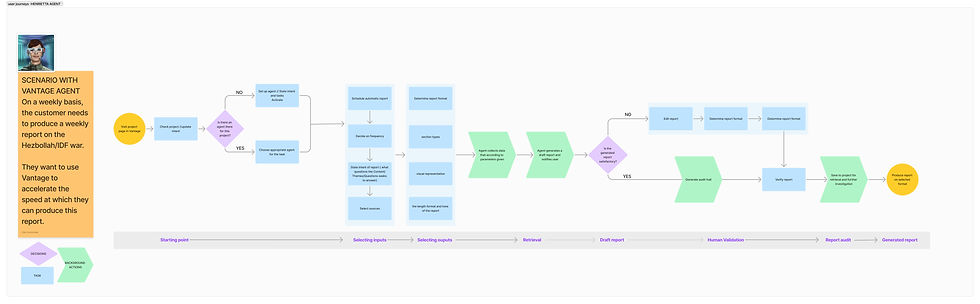
Mapped high-friction analyst workflows
-
Prioritised tasks that AI could assist or automate
-
Sketched out user-agent collaboration flows
-
Ran internal user testing with analysts to validate our thinking
The key design principles emerged:
-
Keep users in control, always
-
Show the AI’s reasoning, build trust through transparency
-
Ensure agent actions align with user goals, not just capabilities
.png)
.jpg)
.jpg)
SOLUTION
The final product was a lightweight internal tool that allowed countries to submit project requests via a structured form and view a shared prioritisation dashboard.
Key features included:
-
Intake form: Standardised inputs for country, project type, estimated effort, expected outcomes
-
Scoring logic: Automated weighting based on predefined business impact criteria
-
Dashboard: Visual prioritisation board, filtered by country, theme, or timeframe
-
Comments & status: Track decisions, feedback, and progress
These features made it easier for regional users to advocate for their needs and easier for central teams to plan with confidence.
LEARNINGS
This project reinforced the importance of designing with users, especially when exploring emerging technology like AI.
A few key takeaways:
Start with real pain points, not capabilities
Transparency isn’t optional, users must understand how and why
Collaboration between UX and data science is critical when shaping trustable systems
Working at the intersection of AI and UX pushed me to think beyond screens and flows. It was about defining new models of interaction—ones that respect the user’s intent, and enhance their potential.
OTHER PROJECTS
Turning billing complexity into a dynamic dashboard
